Mindfront · Product updates

What’s new

Your Mindfront system is built around one central AI — a single intelligence the whole organization works with. This page follows its latest progress: the headline features first, then the smaller improvements, then the fixes.

Nova 7 July 2026
Nova 7 · This release

Not every release needs a headline feature.
This one refines everything you already use.

Faster responses, the latest models, and a smoother everyday experience — chat, approvals, WhatsApp, value reporting, and the Journey.

01

Headline features

The big changes
WhatsApp

Send your central AI system the whole situation—not another summary

A field photo, deployment plan, and voice note can arrive together in the WhatsApp conversation your team already uses. Your central AI system reads the combined evidence, identifies what is blocking the work, and moves the next actions forward from the same chat.

Value

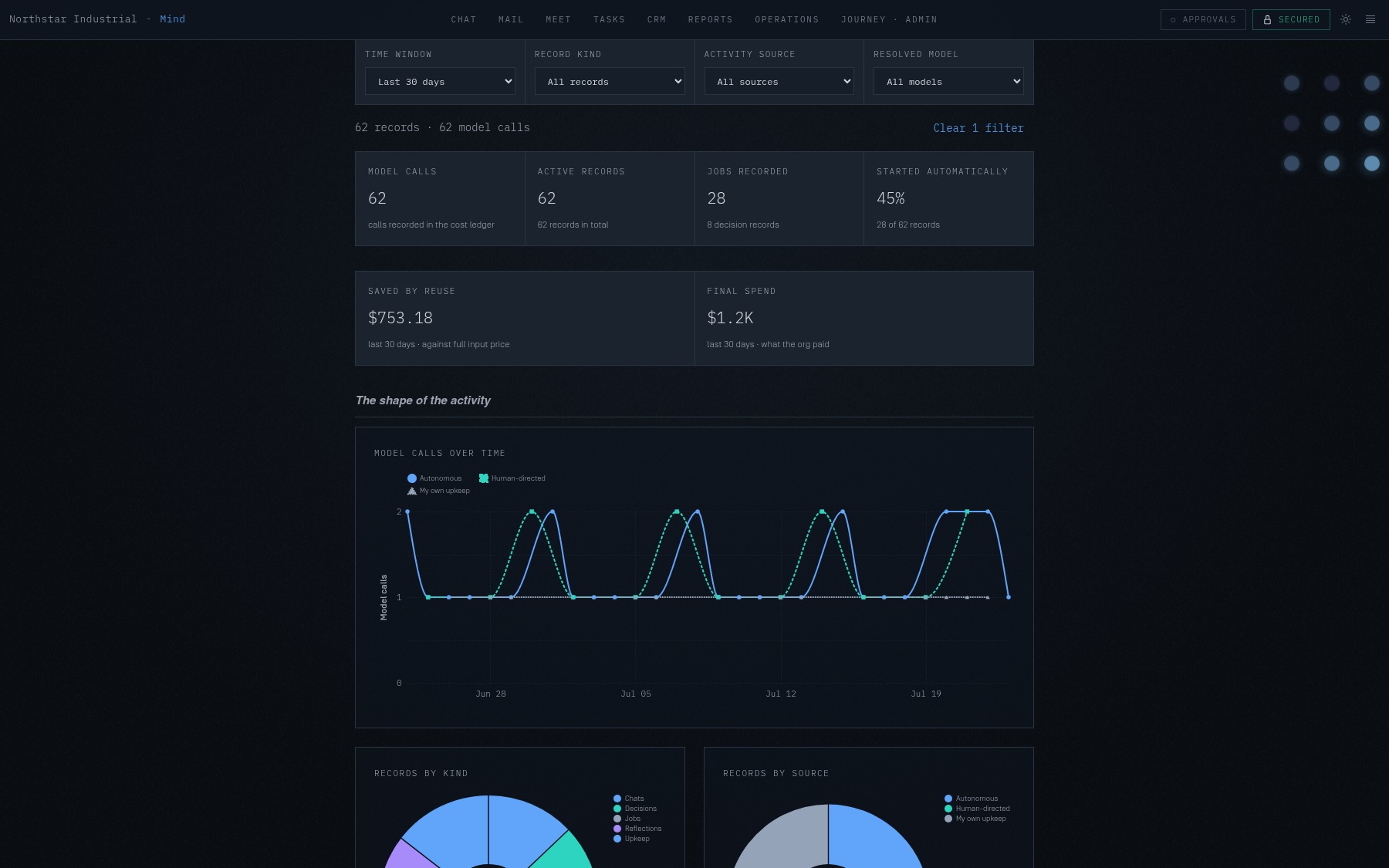
See the work, spend, and savings behind your central AI system

One executive view connects completed work to its model usage, final spend, and savings from reuse—so leaders can understand what your central AI system has done without reconstructing it from individual tasks.

Mindfront Value report showing completed work, spend, and savings for Northstar Industrial
Journey

Configure your central AI system from the Journey

The Journey’s left-hand index keeps every step and control in view. Move from the explanation straight into configuration, make the choice, and return to the climb without losing your place.

Instructions

Standing orders prove their effectiveness

Administrators can see whether an instruction covers the intended work, inspect the evidence behind each match, and connect autonomous activity to a recorded outcome.

Approvals

Review, decide, and resume work in the conversation

Review the exact action your central AI system wants to take, approve or decline it without leaving the conversation, and keep the decision beside its context. The work resumes there—and shows the outcome there.

02

Quality of life

Smaller, everywhere
Mail

Send later—and remember the follow-up

Schedule a message, set a reminder, or send and remind in one continuous flow.

Mail

Important mail keeps its full context

Focused Inbox and complete Outlook threads make the conversations that matter easier to act on.

Access

Imported files keep their mailbox boundary

Microsoft 365 attachments inherit the scope of the mailbox that received them.

Meetings

Existing transcripts become meeting work

Import a transcript directly, then continue from its report and conversation.

Performance

Work starts and reconnects faster

Startup and connection recovery spend less time between intent and a usable workspace.

Desktop

Connections recover themselves

Stale and failed native tunnels recover before they interrupt work.

Setup

Provisioning can be corrected

A setup code remains editable after a provisioning attempt fails.

Settings

Edits hold during live updates

Autonomy and Settings controls stay stable during an active edit.

Models

Model routing stays current

Gemini-family availability and economic selection reflect the current catalogue.

Journey

Navigation fits narrow screens

The Journey’s primary controls remain usable on mobile layouts.

Chat

Active work keeps its glow

The activity signal remains present throughout a long-running turn.

03

Fixes

Small bugs, now gone
Approvals

Decision state, counts, corrections, and evidence agree across chat and the queue.

Orders

History reports recorded work without inferring activity that never happened.

Mail

Mailbox signatures remain stable through learning, preview, refresh, and composition.

Chat

Stalled work recovers without leaving an active request permanently unfinished.

Desktop

Startup and network recovery are more dependable across connection changes.

Security

JavaScript, Go, and HTML-processing dependencies received current updates.